
Keep your buying, stock, and channels in view.
Keep partner terms, buying, product assets, and warehouse inventory together. Manage product publishing, marketplace order capture, and return reconciliation alongside your store operations.
Book your iK Store demo iK Store / Store operations
What iK Store helps you manage.
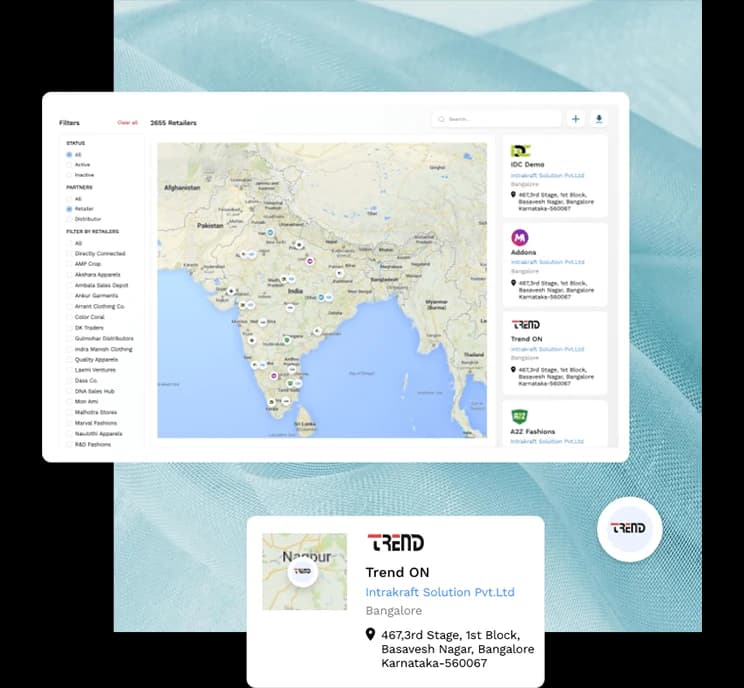
The iK Store offering connects partner records, buying, product information, inventory, and marketplace activity. Give store teams a common view of the suppliers they work with, the products they buy, and the inventory available across locations and channels.
Partner records & terms
Keep centralized partner data and terms of trade, with visibility into orders placed with brands and distributors.
Product asset management
Store product images, documents, technical packs, and other collateral in a digital asset management system.
Unified inventory
Consolidate inventory across warehouses and allocate stock with Virtual Bucketing.
Buying & commercial visibility
The product includes buying, budgets, store-level profit and loss, and data analytics.
Marketplace product publishing
Publish products in multiple formats and manage marketplace inventory from allocated or master inventory.
Marketplace order & return workflows
Use API integration to capture marketplace orders and manage return reconciliation.
Keep buying decisions close to your partner terms.
A store’s buying process depends on the details of the relationship. iK Store includes a centralized repository for partner information, flexible terms of trade, visibility into orders placed with brands and distributors, and alerts supporting credit and payment processes.
- Store partner records in a central repository.
- Capture terms of trade for transparent operations.
- Review orders placed with brands and distributors.
- Use dashboard alerts and reminders in credit and payment processes.
Give your products and stock one shared reference.
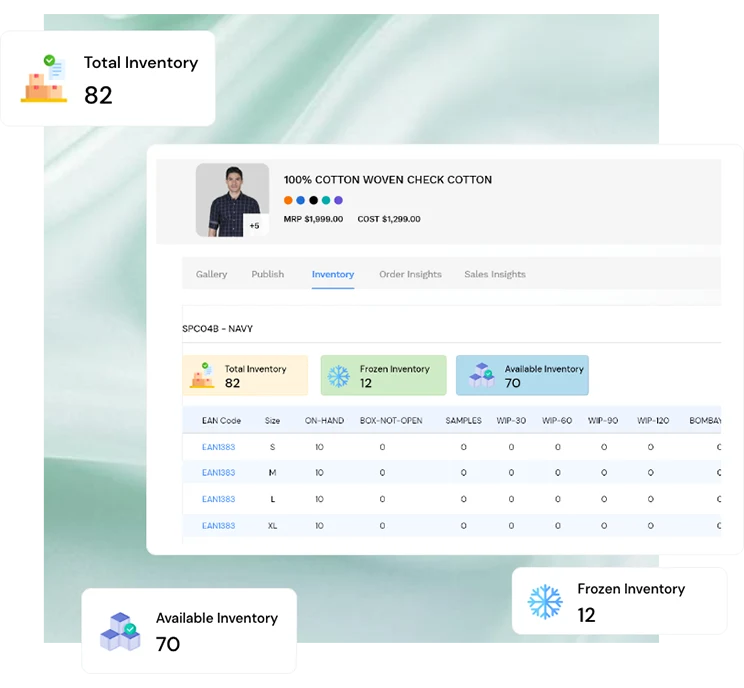
The product information behind a store needs to travel with the stock. Keep product assets together, consolidate inventory across locations, and use allocated inventory to support the way products move between channels.
- Store product imagery, specifications, PDFs, and supporting assets.
- Consolidate inventory across warehouses.
- Allocate stock using Virtual Bucketing.
- Assign products between channels as required.
Bring another route to market into view.
The retailer workflow includes publishing products in multiple formats from iK Store, using allocated or master inventory for marketplaces, capturing orders through API integration, and handling return reconciliation. Discuss the channels you use so the right integration scope can be confirmed.
- Publish product information in marketplace formats.
- Use Virtual Bucketing or master inventory for allocation.
- Capture marketplace orders through API integrations.
- Manage return reconciliation alongside marketplace activity.
See the information behind the workflow.
Product and platform views supplied by Intrakraft. Sample product data illustrates the interface.
A starting point for your store operations.
Set up your buying context
Bring partner data, terms of trade, and the products your stores buy into view.
Organize products and stock
Keep product assets and inventory allocations connected with store activity.
Review your channels
Discuss store, marketplace, order, and returns workflows with the team.
A little more detail.
How is iK Store different from ikPOS?+
iK Store covers partner, buying, product, inventory, and marketplace work. ikPOS is Intrakraft’s Point of Sale system. Our team can walk through the scope of each for your stores.
How does iK Store support marketplace activity?+
Yes. It describes product publishing, marketplace inventory allocation, API-based order capture, and return reconciliation. Confirm your specific channels and integration requirements with the team.
Does it include a shared inventory view?+
The iK Store offering includes inventory consolidation across warehouses and allocation through Virtual Bucketing.
Let’s find your fit.
The right product starts with the right conversation. Bring your current workflows, priorities, and questions to a demo.
Talk to the teamWalk through your day-to-day processes
Explore the product with your needs in mind
Discuss setup, integrations, and next steps
See the wider portfolio.
Get to know iK Store. Bring your questions.
We’ll walk through your day-to-day work and the products worth a closer look.